Elive Retrowave
A Synthwave-Themed OS Experience
Transform your old computer into a high-performance machine with this unique, stable, and ready-to-use operating system that combines captivating Synthwave aesthetics with robust Linux performance.
Immersive Design
Complete Synthwave visual overhaul with neon effects and retro-futuristic aesthetics
Lightning Fast
Optimized for older hardware with Enlightenment desktop environment
Stable & Secure
Built on Debian foundation with rigorous testing and security updates
Unique Experience
Distinctive computing environment that stands out from mainstream OS options
Introducing Elive Retrowave
What is Elive Retrowave?
Elive Retrowave is a distinctive and visually striking version of the Elive operating system, specifically crafted to embody the Synthwave aesthetic [53] [97]. This special edition is not merely a theme but a complete reimagining of the desktop environment, integrating vibrant neon color schemes, retro-futuristic design elements, and a host of customizations that pay homage to the 1980s and early 1990s electronic music and art scene.
Built upon the robust and stable foundation of Elive, which itself is derived from Debian, Elive Retrowave aims to provide users with a unique computing experience that is both nostalgic and highly functional [56] [97].

Key Highlights
Synthwave Design
Deeply integrated theme encompassing window decorations, icons, wallpapers, and subtle visual effects, meticulously crafted to evoke nostalgic yet futuristic Synthwave vibes [53].
Understanding Linux and Elive
A Brief Overview of Linux
Linux is a family of open-source Unix-like operating systems based on the Linux kernel, first released on September 17, 1991, by Linus Torvalds [56]. Linux is typically packaged in distributions (or "distros") that include the kernel, supporting software, libraries, and application software.
Because Linux is freely redistributable, there's a vast ecosystem of distributions catering to diverse needs, from general-purpose desktops to specialized systems for penetration testing, multimedia production, or running on old hardware like Elive [56].
Linux Advantages
- Free and open-source
- Highly customizable
- Stable, secure, and performant
- Vast software repositories
What is Elive OS?
Elive, or Enlightenment Live CD, is a Linux distribution based on Debian, renowned for its use of the Enlightenment window manager (E for short) as its primary desktop environment [56]. Enlightenment is known for its highly configurable and visually appealing interface.
Elive aims to provide a fast, beautiful, and powerful operating system that can run efficiently even on older or less powerful hardware, often "transforming your old computer into a high-performance machine" [53] [97].
Enlightenment Features
- Virtual desktops and pagers
- Graphical effects and animations
- Lightweight yet visually rich
- Highly customizable interface
Features of Elive Retrowave Edition
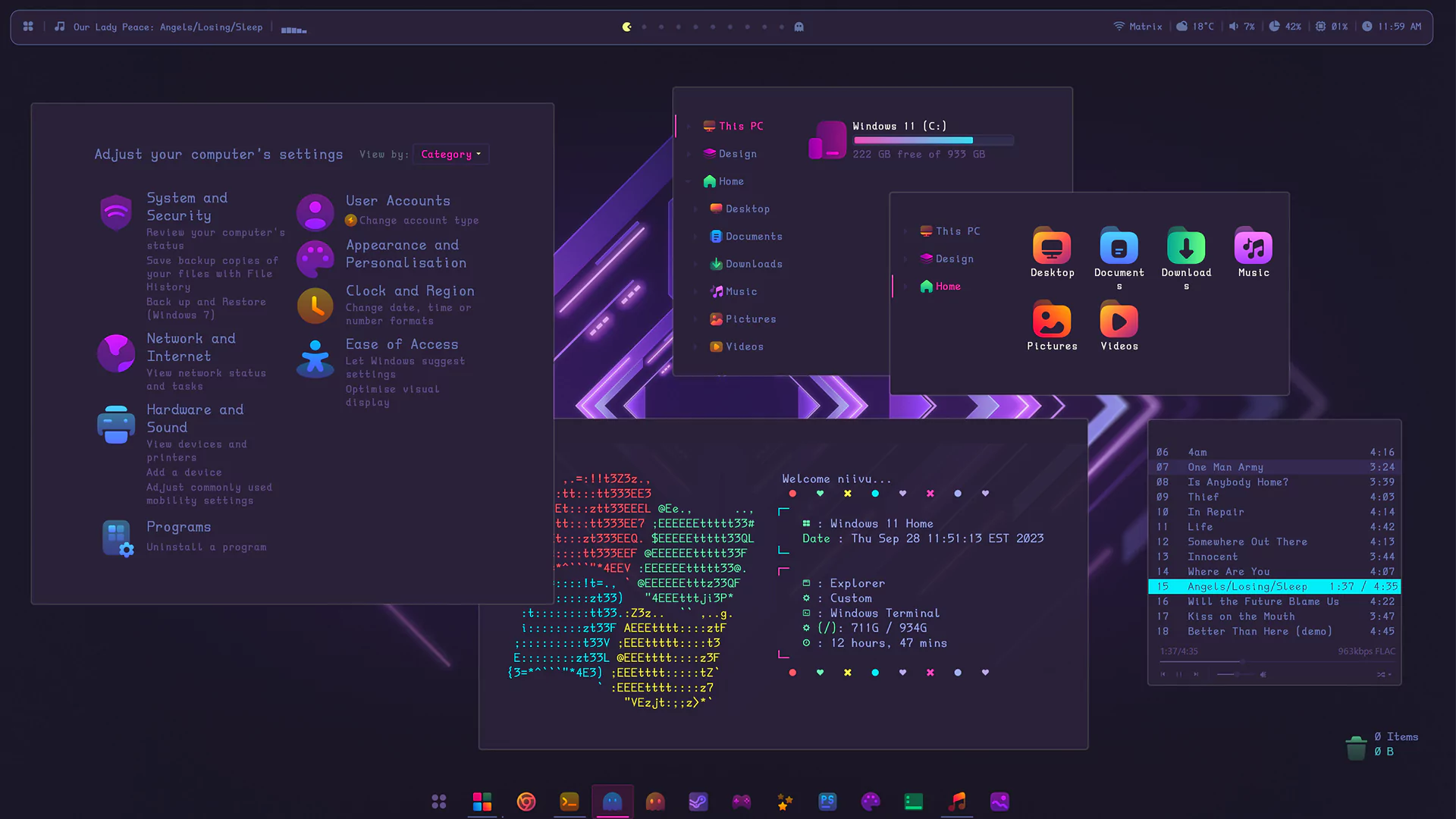
Immersive Synthwave/Retrowave Design
The most defining feature is its immersive Synthwave/Retrowave design, which permeates the entire user interface [53] [97]. This isn't just a simple wallpaper change; it's a comprehensive visual overhaul designed to transport users into a retro-futuristic, neon-drenched world.
The design incorporates "colorful neon effects" and carefully chosen color palettes featuring purples, pinks, blues, and oranges to create a vibrant atmospheric environment [97].
Performance and Stability
Built upon the solid foundation of Debian and utilizing the lightweight Enlightenment desktop, Elive Retrowave can "transform your old computer into a high-performance machine" [53] [97].
This edition is a "special stable release" that has undergone "rigorous testing for months to ensure strong stability and updated drivers" [53].
Performance Benefits
- • Optimized for older hardware
- • Snappy and responsive experience
- • Minimal resource usage
- • Stable and reliable performance
User Experience and Customization
The Enlightenment desktop offers extensive configuration options, allowing users to tailor nearly every aspect of their desktop experience [56]. While Retrowave provides an immersive out-of-the-box experience, users can further personalize their setup.
Elive aims to provide "simple interfaces and automated tools" while maintaining powerful customization capabilities that appeal to medium and advanced users [97].
Software and Applications
Based on Debian, Elive Retrowave provides access to a vast repository of over 50,000 packages [56]. Pre-loaded software includes office suites like LibreOffice, web browsers, media players, and graphics tools.
Security and Privacy
Security Advantages
- Open-source transparency and auditing
- Regular security patches from Debian
- Less susceptible to malware and viruses
Privacy Protection
- No data collection or telemetry
- Greater user control over data
- No hidden backdoors or data harvesting
Comparative Analysis
Elive Retrowave Edition distinguishes itself through its unique Synthwave design and focus on performance, particularly on older hardware. Here's how it compares to other popular operating systems:
| Feature | Elive Retrowave Edition | Windows 11 | macOS Ventura | Ubuntu 24.04 | Linux Mint 21.3 |
|---|---|---|---|---|---|
| User Interface | Synthwave-inspired Enlightenment, highly customizable, retro-futuristic aesthetic [53] [97] | Familiar ribbon interface, touch-optimized, limited native customization | Consistent Apple design; minimal customization | GNOME desktop with some flexibility via extensions | Offers Cinnamon/MATE/Xfce; moderate customization |
| System Requirements | Very low: Runs on older hardware effectively (Pentium 4, 1GB RAM) [53] [97] | Higher requirements: Modern 64-bit CPU, 4 GB RAM recommended | Designed for recent Apple hardware; 8 GB RAM standard | Moderate: 2 GB RAM recommended | Low to moderate: Pentium 4+, 1-2 GB RAM adequate |
| Cost & Licensing | Free and open-source; no license fees [53] [97] | Paid license ($139+ for Pro); upgrades often require payment | Free with Mac purchase; Mac hardware is costly | Free; optional paid support | Free for personal use; paid support options |
| Software Ecosystem | Access to Debian repositories (over 50,000 packages) [56] | Extensive proprietary and free software, often paid | Access to App Store; limited to Apple-approved apps | Ubuntu Software Center; Snap and Flatpak support | Access to Ubuntu/Debian repositories; similar to Ubuntu |
| Privacy & Security | Open-source; no telemetry or data collection [53] [97] | Potential privacy concerns with telemetry; user configuration needed | Generally good privacy; some diagnostic data sent to Apple | Good privacy; potential issues with Snaps debated | Strong privacy; transparency; disable optional reporting |
| Unique Features | Vibrant Synthwave design, optimized for older computers, Enlightenment tricks [53] [97] | Focus on touch, AI (Copilot), gaming integration | Seamless integration with Apple ecosystem (iCloud, AirDrop) | GNOME 43, Wayland by default, Snap integration | Multiple desktop choices, user-friendly install |
vs Windows
- • Cost-effective: Free vs $139+ for Windows Pro
- • Hardware friendly: Runs on Pentium 4 vs modern CPU requirements
- • Customizable: Enlightenment offers more control than Windows UI
- • Privacy-focused: No telemetry vs Windows data collection concerns
vs macOS
- • Hardware agnostic: Runs on any PC vs Apple-only hardware
- • Accessible: Free download vs expensive Mac hardware
- • Flexible: Deep customization vs Apple's controlled environment
- • Unique: Synthwave aesthetic vs macOS uniform design
vs Ubuntu
- • Performance: Optimized for older hardware vs moderate requirements
- • Interface: Enlightenment vs GNOME desktop
- • Theme: Immersive Synthwave vs clean modern look
- • Packaging: Standard Debian packages vs Snap integration
vs Linux Mint
- • Visual identity: Distinct Synthwave theme vs traditional layout
- • Desktop: Enlightenment vs Cinnamon/MATE/Xfce
- • Target: Retro-futuristic aesthetic vs familiar Windows-like feel
- • Performance: Both good for older hardware, Elive more specialized
System Requirements
Minimum Hardware Specifications
Designed to be lightweight and efficient, enabling smooth operation on older systems that might struggle with more resource-intensive operating systems [53] [97].
Processor
1 GHz CPU (Pentium 4 or equivalent)
Memory (RAM)
1 GB minimum (basic functionality)
Storage
8 GB free disk space minimum
Graphics
16 MB VRAM with standard graphics card
Recommended for Optimal Experience
A slightly more capable system will provide a smoother and more enjoyable experience, especially for multitasking and modern web browsing [53] [97].
Processor
1.5 GHz CPU or faster (multi-core preferred)
Memory (RAM)
2 GB or more for better multitasking
Storage
20 GB or more for comfortable usage
Graphics
64 MB VRAM or more for enhanced effects
Performance Comparison
User Testimonials
User Feedback
From DistroWatch community
"Elive retrowave gives a nice techno-style appearance... reminding me of the disco vibes in the nineties"
Join the Elive Community
The Elive project is supported by an active and passionate community of users and developers who contribute to its ongoing development, provide support, and share their experiences.
Community Benefits
- Get help with installation and troubleshooting
- Share tips and customization ideas
- Stay updated on latest developments
- Contribute to the vibrant ecosystem
Download and Get Started
How to Download Elive Retrowave
Downloading the Elive Retrowave Edition is straightforward through the official Elive website. The project maintains a dedicated download section featuring the "Special - Retrowave" version [104].
Visit Official Website
Navigate to www.elivecd.org/download/retrowave
Download ISO
Find the "Special - Retrowave" version and download the ISO image
Create Bootable Media
Write ISO to USB drive or DVD for installation using only Ballena Etcher or Ventoy.
Installation Guide
Elive provides a user-friendly installation process with a graphical installer that guides users through partitioning, user setup, and configuration [46] [47] [49] [65].
Live Environment
Test compatibility and features before installation
Graphical Installer
User-friendly setup with guided partitioning
Theme Options
Option to switch back to default Elive designs [52]
Ready to Experience Elive Retrowave?
Join thousands of users enjoying this unique Synthwave-themed OS
Support Resources
Official Website
elivecd.org
Documentation and FAQs
Community Forums
forum.elivelinux.org
User support and discussions
Linux Community
DistroWatch & forums
Reviews and user comments